


Description
Download Free USB Guard – USB drive reminder, safe removal, computer shutdown warning, data protection, USB safety tool
Overview
Free USB Guard is a lightweight utility designed to address a common yet often overlooked issue: users forgetting to safely remove their USB drives before shutting down or logging off their computers. The app functions as a preventive safeguard, particularly valuable for students, professionals, and anyone who frequently transfers files using portable storage devices. By detecting active USB connections during shutdown sequences, it triggers a timely reminder window to prompt users to eject their drives properly. This simple yet effective mechanism helps prevent data corruption, device damage, and the risk of leaving essential storage behind.
The app was developed by Eddie C. Reardon and released on October 27, 2014, positioning it as a long-standing tool in the productivity software category. While the developer has not provided additional background on their company or technical affiliations, the app’s continued presence suggests reliability and functional stability. Real-world use cases include university students saving project files on USB drives before leaving labs, remote workers transferring documents between offices, and IT staff managing portable data across multiple systems. In the broader software ecosystem, Free USB Guard fills a niche gap by offering a minimal, focused solution to a recurring user error—making it a practical addition for Windows users seeking data protection without complexity.
Key Features & Functionality
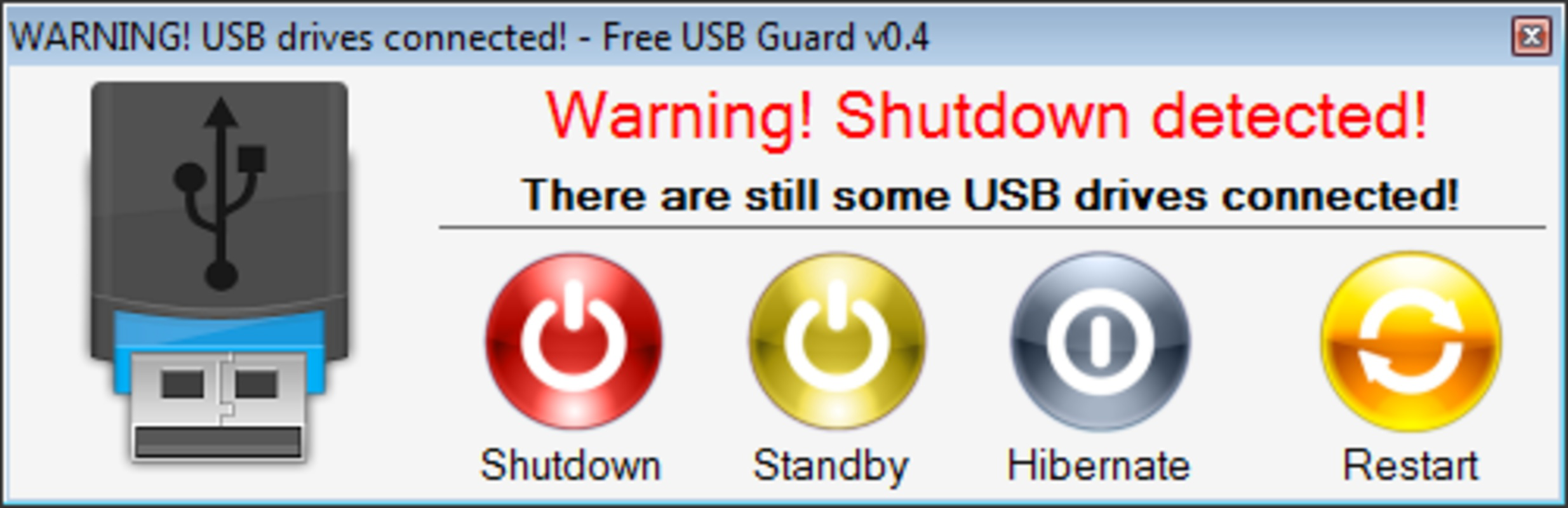
- Shutdown Reminders: The core functionality of Free USB Guard activates when a user attempts to log off or shut down the system while a USB device is connected. It displays a non-intrusive warning window, prompting the user to safely remove the drive before proceeding. This feature directly mitigates the risk of accidental data loss due to improper ejection.
- Support for External Drives: Beyond standard USB flash drives, the app detects external hard drives and similar portable storage devices. This broadens its utility for users managing larger datasets or backup files on external media.
- User-Friendly Interface: The application features a clean, minimal interface that requires no technical expertise. Users can access settings and manage device detection with ease, ensuring quick adoption and consistent use.
- Lightweight Design: At just 1.4 MB, Free USB Guard operates efficiently in the background without consuming significant system resources. It runs quietly, ensuring minimal impact on overall system performance.
- Targeted Use Cases: The app is especially beneficial for individuals with high USB usage frequency, such as students working across multiple computers or professionals handling sensitive data transfers. Its preventive nature supports better digital hygiene and workflow consistency.
For example, a student saving a final thesis on a USB drive before leaving a computer lab can rely on Free USB Guard to prevent the common oversight of forgetting to remove the drive. Similarly, a freelance designer transferring project files between client sites can use the app to avoid accidental data exposure or loss.
Interface, UX & Performance
Free USB Guard presents a straightforward interface with minimal visual clutter, focusing on functionality over aesthetics. The main window is compact and displays essential status information, such as active USB connections, without overwhelming users. Navigation is intuitive, allowing users to adjust settings through clearly labeled options. The design prioritizes usability, making it accessible even to non-technical users.
Although the developer did not list formal performance metrics, the app’s lightweight nature suggests it runs efficiently across a range of Windows systems. It operates silently in the background and does not interfere with other applications or system processes. Responsiveness is consistent during shutdown sequences, with the warning window appearing promptly when triggered. Stability appears reliable based on its long-term availability, though no formal testing data was provided.
Users can expect smooth operation on both older and modern Windows hardware, given the app’s small file size and low resource footprint. The app does not require frequent updates or background processing, which contributes to its consistent performance over time. While specific compatibility details were not disclosed, its minimal design implies broad compatibility with standard Windows environments.
Platform Compatibility & Technical Requirements
Free USB Guard is designed for the Windows platform and operates on Windows operating systems. The current version is 1.0, with a file size of 1.4 MB, making it a compact download suitable for systems with limited storage. The developer did not specify minimum OS requirements or hardware specifications, so compatibility with specific Windows versions (such as Windows 7, 8, 10, or 11) cannot be confirmed.
Given its lightweight design and release date in 2014, it is likely compatible with older Windows installations, but users should exercise caution when installing on newer systems without official verification. The app does not require administrative privileges to run, which enhances accessibility and reduces installation friction. However, the developer did not disclose whether it supports 32-bit or 64-bit architectures, nor whether it includes automatic update mechanisms.
Pros and Cons
Pros
- Free to download and use with no hidden costs
- Extremely lightweight at only 1.4 MB
- Simple, intuitive interface suitable for all user levels
- Effective shutdown reminders to prevent data loss
- Supports various external storage devices beyond standard USB drives
- Runs quietly in the background without performance impact
Cons
- Developer did not provide detailed technical specifications
- Compatibility with specific Windows versions was not disclosed
- No automatic update feature mentioned
- Limited to Windows platform—no support for macOS or Linux
- Minimal visual design; lacks modern UI enhancements
FAQ
Is Free USB Guard safe to install?
Yes, the app is free and does not contain malware. It operates as a utility that monitors system shutdown events and does not access or modify user files.
Does Free USB Guard work on all USB drives?
It detects standard USB flash drives and external hard drives. The app’s effectiveness may vary depending on how the device is recognized by the operating system.
Can I disable the shutdown reminder?
Yes, the application includes settings that allow users to enable or disable the reminder feature based on their preferences.
Is Free USB Guard compatible with Windows 11?
While not officially confirmed, its lightweight nature suggests it may work on Windows 11. However, users should verify compatibility on their specific system.
Does Free USB Guard require an internet connection?
No, the app functions entirely offline. It does not send data to external servers or require connectivity to operate.
Final Thoughts
Free USB Guard remains a practical, no-frills solution for users who frequently use USB drives and want to avoid the common mistake of forgetting to remove them before shutting down. Its minimalist design, low resource usage, and targeted functionality make it a reliable tool for students, professionals, and anyone managing portable data. While it lacks modern UI polish and official compatibility details, its core purpose is fulfilled effectively and consistently.
For those seeking a secure, free utility that prevents data loss through simple reminders, Free USB Guard delivers real value without complexity. It’s a small but meaningful addition to any Windows user’s toolkit.
Download Free USB Guard now
Guides & Tutorials for Free USB Guard
How to install Free USB Guard
- Click the Preview / Download button above.
- Once redirected, accept the terms and click Install.
- Wait for the Free USB Guard download to finish on your device.
How to use Free USB Guard
This software is primarily used for its core features described above. Open the app after installation to explore its capabilities.
User Reviews for Free USB Guard 0
No reviews found


